
There are lots of helpful AI tools for Microsoft PowerPoint. They can help you not just streamline and fix errors in your presentations but also generate content and entire slides in seconds, all from a simple and quick prompt.
This guide looks at some of the best AI tools for PowerPoint.
Julius AI: PowerPoints for Data with a Built-In Slide Editor
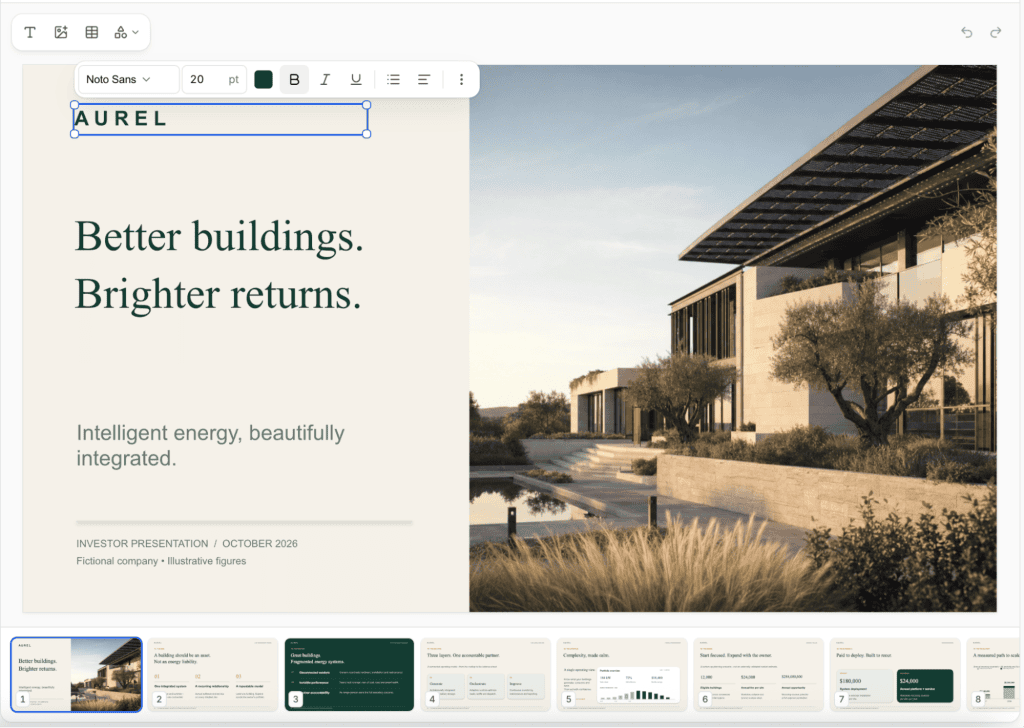
The Julius AI presentation maker helps you turn a prompt, document, PDF, or spreadsheet into an editable PowerPoint presentation. You can go from text to PowerPoint, convert Excel data into charts and slides, or create pitch decks and business presentations using templates and your own branding. Describe your topic and audience, and the AI slide generator builds the content and design.
Its new built-in slide editor brings familiar PowerPoint editing tools directly into Julius. Edit your slides manually or ask the AI to rewrite text, update visuals, and adjust layouts as you work. You can then export your slide deck as an editable PPTX for Microsoft PowerPoint, export it to Google Slides, or download a PDF. Free daily credits let you try the presentation maker before choosing a paid plan.

A great way to engage your PowerPoint audience is through interactivity, using questions and answers that your viewers can actually respond to as they observe the presentation. Mentimeter is one of the AI tools for Microsoft PowerPoint that delivers those invaluable interactive elements.
With the AI Menti Builder feature, you can basically ask the AI to make the likes of Q&As, polls, and feedback slides for you. It’ll generate whatever you need in seconds, which should make it easier to boost engagement with all your future presentations – an ideal fit for the likes of educators or public speakers.

Beautiful.ai is more famous as an AI-powered PowerPoint alternative, rather than a dedicated AI tool for PowerPoint itself. However, there is a Beautiful.ai PowerPoint add-in that essentially lets you harness this tool’s AI slide-creation technology from within the PowerPoint app.
In real terms, that means you’ll get access to many so-called “Smart Slides,” which will adapt and improve their aesthetic accordingly as you type in your content. It’s like having a dedicated AI designer improving the look and flow of your presentation on the fly as you flesh it out with more information. Plus, as the name implies, it’ll work wonders for improving the overall beauty of your presentations.

ClassPoint AI is another of the many AI tools for creating PowerPoint presentations, with a key focus on interactivity and engagement. Specifically, this AI bot scans your slides, understands their content, and then cooks up creative, relevant questions to ask your audience. As such, it’s one of the top tools to consider if you’re creating educational or instructive PowerPoints.
You can customize the complexity of the AI-generated questions to suit different audiences, like high school classes or business conferences. Best of all, it’s free while you’re getting started, though you’ll have to pay for a Pro plan to get all the features and functions.

Auxi AI is a slides AI for Microsoft PowerPoint that’s all about speed and efficiency. It helps you build PowerPoint slides super fast, working from simple user prompts to get the kind of content you need for an impactful and attractive presentation.
Using a range of machine learning models, this PowerPoint AI add-in can suit all sorts of creators, from business users like marketers and analysts to the more casual crowd. One of its key features is the “Smart Bar,” which lets you use and access hundreds of different format and layout functions via quick keyboard shortcuts, adapting to your content and editing history.
Plus AI: A Top AI App for PowerPoint Presentation Generation

Plus AI is an AI app for PowerPoint, which also works with Google Slides, that you can use to create entire presentations, not just individual slides, from a single prompt. Just type in what your presentation needs to cover, and the AI will do most of the hard work for you.
It offers preset prompts to save you even more time with common presentation topics, and it also provides editing and refining tools to streamline your PowerPoint content. You can rewrite, paraphrase, or sum up slides with a couple of clicks, for example, or adjust slide formatting on the fly without having to navigate menu after menu.
Thanks for your feedback!