
The year 2025 introduced us to some of the most advanced AI image generators. As these image generators have evolved, 2026 brought even better and more advanced AI image generators.
I tested 20 AI image generation tools to their limits and generated an image using a common prompt to help you pick the best tools for your needs. Let’s check out!
20 Best AI Image and Art Generators For 2026 (Top Picks)
In 2026, AI image generators are likely to expand. Some of the new tools might emerge, whereas existing tools will come up with advanced image generators and features. Here are some of the top ones to keep an eye on:
| AI Image Generator | Best For | Price | Link to start generating |
|---|---|---|---|
| Midjourney | Best for Image upscaling and using complex prompts | $10/month | Try Now |
| ChatGPT (GPT4o) | Best for precise images | Starts from $8 | Try Now |
| Gemini Nano Banana | Latest & fastest AI image generator in Gemini | Starting from $19.99/mo | Try Now |
| Leonardo AI | Best for creating and training your own AI model | Starts from $10/mo | Try Now |
| Playground AI | Ideal for generating images in a private session | Starts from $12/mo | Try Now |
| Starry AI | Best for people who need help with prompts | Starts from $4.99/week | Try Now |
| Bing AI Image Creator | Best Free option on the market | Free to use | Try Now |
| Nightcafe | Best for custom community models | Starts from $5.99/mo | Try Now |
| Canva AI Image generator | Best AI image generator for people who are already using Canva | Starts from $15/mo | Try Now |
| Magnific | Best free image generator for stock images | Starts from $20/mo | Try Now |
Note: The AI image generators listed and their results shared are unique to each user. Please consider them for representation purposes only, not as the final product for each user. If using the same prompt, your results may vary a bit.
How I Tested and Ranked These Image Generators?
To determine the best AI image generators for 2026, I conducted a thorough evaluation of the most up-to-date features, image generation quality, and pricing of AI image generators from a pool of 50 tools we selected.
Further, I ran a common prompt with each AI image generator and checked the received result for its:
- Accuracy of the prompt
- Generated image quality
- Editing features offered for the generation
- Cost of using the tool
By checking each tool against the above 4 factors, these 19+ top AI image generators were shortlisted.
While researching, I found many users seeking AI image generators for unethical, NSFW purposes, aiming to generate vulgar images like:
- Mickey Mouse Smoking
- 19-year-old girl AI image generator
- Pope wearing a puffer jacket
Considering all these requests and searches, I ensured that I removed any AI image generators that cater to such requests and violate our community guidelines.
Prompt used: A Panda chilling on a beach, wearing sunglasses and a hat, sipping a cocktail, overlooking a sunset, and sitting on a chair.
1. Midjourney – Overall Best Image Results
| Rating | 4.9 |
| Model used | Own diffusion model |
| Ease Of Use | 4.2 |
| App | No – runs on Discord & Web |
| Free Trial | Not Available |
Here’s an example of the image I generated:
Prompt used: Panda on a beach chair wearing sunglasses and a beverage in his hand.

Released on July 12, 2022, the Midjourney AI picture generator took the world by storm with its capability to create spectacular images. This wildly popular platform is known to have 14.5 million registered members, out of which around 1.2 million to 2.5 million are active at any given time.
This amazing AI image creator has been a tough competition with the likes of DALL-E 2 and DALL-E 3, and other known AI image tools, with its high-quality and detailed image generation.
While the AI-generated images from Midjourney are of the highest quality, Midjourney also allows users to control the quality, ratio, variance, style, filter, etc of an image. But working with Midjourney requires patience and a willingness to learn.
Midjourney is available on Discord and through a web-based interface, but it does not have a standalone application.
While the learning curve is high on Midjourney, once you get the hang of it, you can generate high-quality images with accurate details.
Overall, I love the details that you get with each image that you generate. For me, Midjourney was a solid 10/10!
Verdict: I was stunned by the quality of the image that Midjourney threw at me. Looks like a still out of a magazine cover!
Midjourney Key Features
Pricing
Midjourney used to offer a free trial for using the service on Discord, but has recently stopped. The paid plans for this exceptional AI image generator start from $10/mo.
Here are some reviews of Midjourney posted on G2.
2. ChatGPT (GPT-4o)- Easiest To Use AI Image Generator
| Rating | 4.8 |
| Model used | Own diffusion model |
| Ease Of Use | 4.8 |
| App | ChatGPT mobile app available |
| Free Trial | 2 Free image generations per day |
This AI image generator started off as DALL-E, which developed into DALL∙E 2, and now the new GPT 4o image generation model after DALL∙E 3. Evolving from DALL-E 2 as a separate image generation model priced separately, DALL-E 3 is now an integral part of the ChatGPT Plus subscription.
The GPT-4o image model created many headlines recently, with many advertising professionals using its potential to deliver high-quality AI image generations combined with ease of use.

This model uses natural language to understand the user prompt and create realistic images. It is capable of generating images in different styles and ratios and also allows users to add, remove, or replace a subject/object in an image right within the popular ChatGPT interface.

It is the latest advancement to OpenAI’s image generator series, which now can be used for free without a paid subscription.
Verdict: DALL-E 3 was one of the closest to following the prompt and generating a result that’s really well refined. Just look at the sand structure around the legs of the chairs!
GPT4o Image Generator Key Features
-
Images are copyright-free. -
You can further edit generated images. -
The output timing is quick. -
Option to inpaint, outpaint and add variations to the image. -
Combine attributes, concepts, and styles.
Pros
-
Easy to use with no learning curve. -
Doesn’t allow the creation of violent, abusive, or harmful content -
Out-painting feature to create larger AI art
Cons
-
Inaccurate results are rarely generated. -
DALL E 2 requires an additional subscription -
The results may not be accurate sometimes
Pricing
GPT-4o comes with the ChatGPT Plus subscription, which starts at $20/month. For creating up to 20 images per day, you can try ChatGPT Go, starting at $8/month.
User Review:
“An impressive software that can force you saying wow”
⭐⭐⭐⭐⭐
3. Gemini Nano Banana & AI Image Generator
| Rating | 4.8 |
| Model used | Gemini 3.1 Flash |
| Ease Of Use | 4.8 |
| App | With the Gemini App |
| Free Trial | Up to 100 images per day |
Google Gemini recently launched the hot new trend in the AI Image generation market of tools. This major upgrade lets you generate your AI image in a flash and edit it to the craziest level you can imagine.
Banana AI image generator allows you to combine different scenes, elements, and characters from existing images or prompts into one.

Gemini Banana AI image generator has been making headlines since its launch, as this comes off as a major upgrade to its existing image generation features. I remember when Gemini introduced AI image generation features and how bad it was.
Testing the new Gemini AI image generator with our test prompt shared surprising results, as I got the exact image I was expecting, and it took about 3 seconds to receive a result from the prompt.
Image result:

Gemini Nano Banana Key features:
-
Great character consistency -
Multi-Turn Editing features -
Text rendering and quality are good
Pros
-
Equally suitable for beginners and experts alike
Cons
-
Image generated strictly comes with a Gemini watermark -
Daily limits for the free model
Pricing
Paid access to the Gemini Bana AI image generator starts from $19.99/per month for Google AI Pro
4. Leonardo AI (Free & Paid) – Best For Marketing, Designing, Photography, And Architecture
| Rating | 4.9 |
| Model used | Stable Diffusion, Leonardo Diffusion, Leonardo Alchemy and other custom models |
| Ease Of Use | 4.7 |
| App | iOS |
| Free Trial | 150 fast generations per day |
Leonardo AI is known to provide its users with an augmented creative experience. It lets you choose from a long list of models for your needs, like their own combination of Leonardo diffusion, Stable diffusion, etc. Additionally, with Leonardo.AI, you can train your own models and access models developed by others.

It has some unique features that make editing go beyond the basics and allow detailed image generation as per the requirements. This AI image generator lets you play around with different modes, prompt guides, and image models to refine the images.
Leonardo AI’s option to develop your own model really sets this image generator apart and is something to look forward to. Let’s have a look at the image it generated for our master prompt.

Verdict: I couldn’t believe this image quality and am impressed with the level of detail Leonardo AI captured in this picture. I’d definitely recommend using the Leonardo AI image generator.
Leonardo.ai Key Features
-
Access To Stable Diffusion models -
LLM-powered prompt assistance.
Pros
-
AI-powered canvas for greater control. -
Powerful image models to choose from. -
Extreme control over quality and variations. -
Dimension size suggestions for images.
Cons
-
Accessible only for select users – works on a waitlist program.
Pricing
Leonardo AI offers 150 free generations per day, and the paid plans for this AI image creator start at $10/mo.
5. Playground AI (Free & Paid) – Best AI Image Generator With Extensive Templates
| Rating | 4.8 |
| Model used | Stable Diffusion |
| Ease Of Use | 4.7 |
| App | iOS |
| Free Trial | 50 images per day |
Playground AI is an exceptional image generator that uses AI to generate high-quality images. This tool is arguably the best free AI image generator and also ranks on top as a Midjourney alternative. Playground AI uses Stable Diffusion models like SDXL and their own model – Playground v3 as a base.
The new Playground v3 has recently been launched and showcased impressive results in this technical report.
The difference in image generation is evident, and in my opinion, it is better most of the time.

Within the tool, you get expert control over the dimensions and expand prompts using AI, quality, prompt guidance, seed, and the number of image generations.
Initially, you could generate up to 1000 free images per day, but now the generation has been reduced to 50 free images per day.

Verdict: An unexpected result, to be honest. Playground AI has really upped their game after the recent updates!
Playground Key Features
-
Three image models are available – Stable Diffusion 1.5, SDXL, and Playground V2. -
Image-to-Image generation.
Pros
-
Unique SDXL styles and filters. -
Sampler choices are available to add subtle differences. -
The choice to use a private session.
Cons
-
Free images are now limited to 500 per day. -
Fixed image dimensions in the free version.
Pricing
Playground AI offers a valuable free experience with 500 images each day. However, you can buy some more advanced features for $12/mo.
6. Starry AI (Free & Paid) – Best AI Image Generator For Simple User Experience
| Rating | 4.5 |
| Model used | Altair and Orion |
| Ease Of Use | 4.8 |
| App | iOS and Android |
| Free Trial | 5 free credits daily |
Starry AI is an easy-to-use AI image generator that lets you enjoy the tool with 5 free credits per day. Within this tool, you can create –
-
Images with your unique style
The tool is helpful to assist in prompt building and offers a variety of styles to choose from for each of the above types. You can also generate an image based on an existing image and edit it further.
Starry AI is based on Altair and Orion, which use the VQGAN-CLIP model and CLIP-Guided Diffusion, respectively, to create artwork.
Additionally, the Starry AI interface felt similar to Limewire and Jasper in terms of ease of use.

I generated an image from Starry AI, and here are the results:

Verdict: A correct depiction of the given prompt. However, the quality of the image could have been better.
Starry AI Key Features
-
Easy GAN AI art creation. -
Allows complete ownership of the generated images. -
Updates are rolled out frequently to introduce new features.
Pros
-
Effective prompt builder tool. -
Aspect ratio flexibility. -
Seed and runtime controls. -
“Remove from image” option. (negative prompt)
Cons
-
Previews are not as detailed and tend to consume unnecessary credits.
Pricing
Starry AI offers 5 free credits per day, and the price for additional credits starts at $4.99 per week for the Starter plan.
7. Bing AI Image Creator (Free) – Best Free AI Image Generator
| Rating | 4.8 |
| Model used | DALL-E 3 |
| Ease Of Use | 4.9 |
| App | Works with Bing |
| Free Trial | Forever Free |
Bing AI Image Creator or ‘Microsoft Designer’ is a lesser-known image generator and one of the few to have the ability to run OpenAI’s latest DALL-E 3 image generation model to generate images from text, a service otherwise only available for paid ChatGPT Plus users.

It is a great free option that runs directly on the Bing search engine and provides 4 image options with each prompt. You can even customize an image further by using “Designer” by Microsoft, where you can remove the background and add text and elements (pretty much like Canva).
Bing Image Creator’s ability to use DALL E 3 really makes the generated images stand out, the image looks much more realistic and refined, just like the one from ChatGPT.

Verdict: One of the highest-quality images that I got in this list is from Bing AI Image Creator.
Bing AI Image Creator Key Features
-
Works directly on the Bing browser. -
Get 60 daily image boosts. -
Unlimited image generation after free credits. (at a slower speed) -
Surprise me option to get creative.
Pros
-
Completely free AI image generator. -
Works on the latest DALL E 3.
Cons
-
Cannot edit the images further. -
No option to change aspect ratio, style, seed or variation.
Pricing
This tool by Microsoft is completely free, and users can generate 100 free AI images daily using the Bing AI image creator.
Demandsage Bonus: Bing is also a very good AI chatbot and has performed better than ChatGPT and Bard. Check out my simultaneous comparison between Bing, ChatGPT, and Google Bard.
8. Nightcafe (Free & Paid) – Best AI Image Generator For Generating Art
| Rating | 4.7 |
| Model used | FLUX 2 Klein 9B, FLUX 3, Nano Banana 2.1 |
| Ease Of Use | 4.7 |
| App | Android and iOS |
| Free Trial | 5 free credits per day |
Nightcafe is a great source for creating AI-generated images based on multiple AI image-generation models. It uses Stable Diffusion, DALL E 3, Google Imagen, DALL E 2, and many more, and it lets users create and use custom models.

The tool offers 5 free credits to every user per day, where the average consumption for one image generation is one credit. Nightcafe comprises an advanced prompt editor that allows you to tweak your images, set the image runtime, aspect ratio, and even prompt weights. Using this tool requires prior experience to understand some of the features.

Verdict: Nightcafe did a decent job, in my opinion. However, I feel it could do better in terms of detailing.
Nightcafe Key Features
-
A mobile app is available. -
Copyright ownership of the image. -
Advanced image generation controls.
Pros
-
Multiple image models are available. -
Can use community-created models. -
High-quality styles to choose from.
Cons
-
Censorship in prompts sometimes filters out even benign terms hampering creativity.
Pricing
Nightcafe can be used each day with 5 credits, and the premium services can be bought at $5.99/mo for 150 credits.
9. Canva AI Image Generator – Best AI Image Generator For Designers
| Rating | 4.4 |
| Model used | DALL E, Google Imagen, Mojo AI |
| Ease Of Use | 4.6 |
| App | iOS and Android |
| Free Trial | Depends on the model selected |
The crowd-favorite image/graphic editing tool also offers image generation with artificial intelligence. It works on multiple image models, but DALL-E, Google Imagen, and Canva Magic Media are the most prominent. There are other models available that can help create QR code art, high-quality portraits, etc.

You can generate an image using any template you wish, as you can for normal photos and videos for a Canva project. Depending on the image model you choose, you get free credits to use it. Out of all the models tested, I found Canva Magic Media to give the best result.
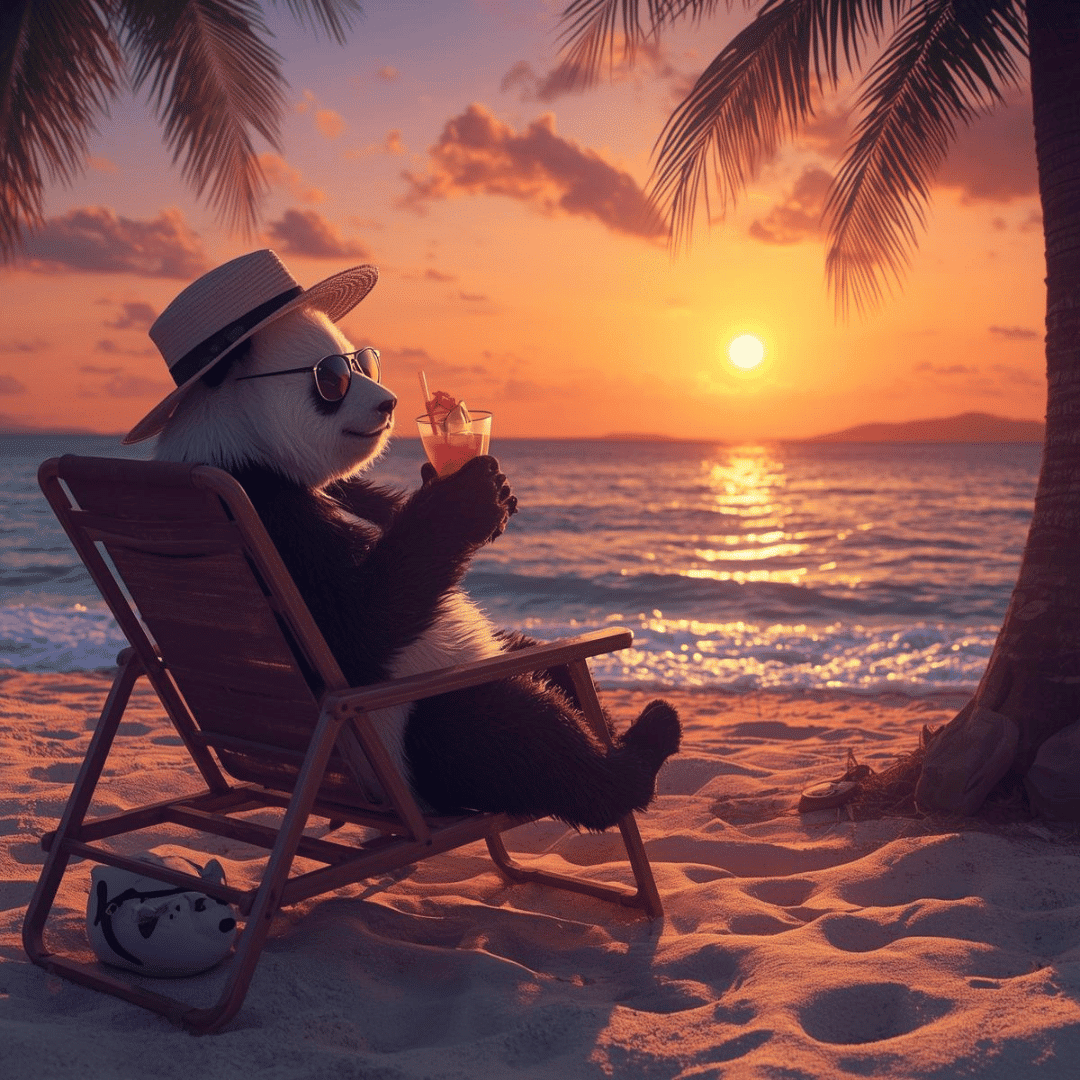
Canva’s newest model typically gives you 4 image options to choose from for a prompt. You can pick the best result or further optimize it to add more minute details.
Verdict: I couldn’t believe this image quality and am really impressed with the level of detail Canva captured in this image. You can give Canva AI image generator a try if you are looking for a free AI image generator.
Canva Magic Media Key Features
-
Google Image, DALL E and Magic media models. -
Generate images with required templates. -
Easily share projects with teams.
Pros
-
Multiple AI creative apps. -
Best for entrepreneurs, beginners and creators.
Cons
-
Too complex to use for beginners
Pricing
Canva AI Image can be used for 50 image creations with the Magic Media model, and the paid plans start at $15/mo with the Canva Pro plan. If you are new, you can start with a Canva free trial. But make sure to check availability, as it offers different durations for different regions.
10. Magnific (Freepik) Image Creator – Best AI Image Generator For Stock Images
| Rating | 4.7 |
| Model used | Diffusion model |
| Ease Of Use | 4.8 |
| App | Not Available |
| Free Trial | 20 free images per day |
Magnific (previously known as Freepik) is one of the fastest-growing startups and the go-to place to get graphics, vectors, and PSD files now has AI image generation capabilities.
Generating an image on Magnific is as simple as searching for one. Just select your subject, the background, and the style and hit the “Generate” button. You can select a range of styles, namely:

I tested Magnific to generate the image (with the same prompt as others). The results were quite impressive. Check it out below.

You can easily upscale the generated image and edit it further by adding text, elements, and filters.
Verdict: I found Magnific interaction objects with the subject’s body elements. The overall image generation speed of this AI image creator is very fast and also provides good-quality results.
Freepik Image Creator Key Features
-
Multiple styles to choose from. -
Initial variation in images.
Pros
-
Easy application of filters and editing.
Cons
-
The quality of the generated images can be enhanced.
Pricing
Magnific offers 20 free images a day for its AI image creator. Paid plans of Magnific start from $20/mo.
11. Grok – Best Unfiltered AI Image Generator
| Rating | 4.6 |
| Model used | Aurora |
| Ease Of Use | 4.9 |
| App | Available on X, and Grok app + website |
| Free Trial | Up to 10 prompts every 2 hours |
Grok is a new AI image generator making a name for itself as the best AI image generator, almost challenging the likes of GPT-4o and Midjourney. This AI image generator from xAI is the AI venture led by Elon Musk.
It is one of the most fun AI image generators to use, as the interface is pretty simple, and allows you to generate images of famous personalities too.

Grok is an unfiltered AI chatbot that provides access to AI image generation from a separate app and website, or via ‘X’ (formerly Twitter), combining general AI assistance with powerful AI image generation capabilities.
Image result:

Grok Key features:
-
Get 4 image variations per prompt. -
Celebrity image generation -
Realistic portrait generation -
Post the generated image directly on X
Pros
-
Seamless AI image generation -
Does not block celebrity image generation -
Multi-use AI image generator
Cons
-
Watermark-generated image -
Privacy and ethical concerns
Pricing
For an affordable price of $16/month for an X Premium+ membership, you can get the most access to Grok.
12. Meta AI – Most Accessible AI Image Generator
| Rating | 4.7 |
| Model used | Emu image-synthesis model |
| Ease Of Use | 4.8 |
| App | Accessible with Meta Apps |
| Free Trial | Completely free to use |
The latest addition to the list of AI image generators is Meta AI’s image generation feature across Meta AI applications like WhatsApp, Instagram, and Facebook, powered by the Emu synthesis model trained on 1.1 billion photos.

Using this new AI feature, which comes with AI chat assistance capabilities, is pretty simple, much like using ChatGPT. However, there were many editing features that were missing from the tool. But a plus point is that you can directly chat and ask the AI to make the required changes.
Let’s see how it performs with our master prompt!

Verdict: While the quality of the image is pretty crisp and detailed, the relevance of the objects and scale proportions looked a bit off.
Meta AI Key Features
-
Can animate the generated AI image -
Allows you to instantly share the generated image with friends
Pros
-
Allows you to edit the image with a simple prompt -
Quick image generation speed -
Easy to use without complex parameters to choose from
Cons
-
Image generation quality is not impressive -
Limited image editing features.
Pricing
The best part about Meta AI is that it is totally free to use as of now and can be accessed across popular Meta social media apps and websites.
13. Dream Studio by Stability.aI – Best AI image generator using Stable Diffusion
| Rating | 4.2 |
| Model used | Stable Diffusion |
| Ease Of Use | 4.4 |
| App | Not Available |
| Free Trial | 20 free credits on sign-up |
The next tool is Dream Studio by Stability.ai, which is based on Stable Diffusion 1.6 and XL image model. This image generator is super easy to sign up for, and a new user gets 20 free credits, which roughly translates to 103 image generations.

The free credit usage depends on the number of steps you want the model to take to generate an image and the image model you choose. You can generate an image with the desired dimensions and can further edit the results, too!
Let’s see how it performs with our prompt!

Verdict: I am not impressed with the image generation here and see others performing a lot better.
Dream Studio Key Features
-
Stable Diffusion v1.6 and XL available. -
Prompt strength, dimensions, seed and steps control. -
Image-to-Image generation.
Pros
-
In-painting and out-painting features.
Cons
-
Limited free credits on signup.
Pricing
Dream Studio offers 20 free credits for users to start with, and allows you to purchase 1000 credits for $10
14. Dream By Wombo (Free & Paid) – Best AI Image Generator For Rapid Artwork Creation
| Rating | 4.1 |
| Model used | iOS neural network and CLIP |
| Ease Of Use | 4.8 |
| App | Android and iOS |
| Free Trial | For 3 days |
Dream by WOMBO is the next free AI image creator on my list. It works on its individual website, mobile app, and even on Discord. The premium “dream” members get priority image generation and access to a wide range of styles and can also generate more images at a time.

One unique feature I found about this tool is that it lets you remix your NFTs and create an image with reference to your NFT. The image generation of Dream by WOMBO is honestly not that great, and I completely got my prompt wrong.

Verdict: A not-so-good image generation; the prompt understanding and the image are all unsatisfactory.
Dream by Wombo Key Features
-
Mobile app and Discord interface available. -
Copyright of the generated images to the users. -
Simple user interface.Remix and recreate NFTs.
Pros
-
Premium styles to choose from. -
Input image generation feature.
Cons
-
Inaccurate image generations. -
Limited Free trial features.
Pricing
Dream by WOMBO offers a 3-day free trial for all new users that allows unlimited generations for that time. For premium access, the plans start from $9.99/mo.
15. Craiyon (Formerly DALL-E Mini) – Basic AI Image Generator To Practice With
| Rating | 4.7 |
| Model used | DALL-E |
| Ease Of Use | 4.8 |
| App | Not Available |
| Free Trial | Free forever |
This AI image tool was previously known as DALL E mini but was renamed Craiyon. The tool is pretty straightforward to use and does not require any sign-up.

With its expert mode, you can use the all-new v4 that can also generate AI vectors for the shared prompt. You can also insert a negative prompt for the things you dont want to be generated inside your content.

Verdict: Craiyon finds it difficult to understand complex prompts traditionally and is quite justified in being based on an older DALL E model.
Craiyon Key Features
Cons
-
Image generation takes a lot of time.
Pricing
Apart from free access to the tool, you can subscribe to Craiyon 125 starting from $10 for advanced features like unlimited images, watermark-free images, high-priority generations, etc.
16. Runway AI – Best AI Image Generation For Professionals
| Rating | 4.1 |
| Model used | Gen-3 Alpha |
| Ease Of Use | 4.5 |
| App | iOS |
| Free Trial | 125 one-time free credits |
Runway is a unique image generator that works on its individual Runway Gen-3 Alpha model. This tool is trusted by many top marketers and creatives like Vox, Google, Publicis Groupe, New Balance, Ogilvy, etc.
Speaking of its AI image generation abilities, Runway AI can turn any descriptive text into stunning art. This tool also possesses the ability to generate images in bulk as per chosen settings and train your own model.

Let’s see how Runway AI performs for the master prompt.

Verdict: I tried out Runway’s styles to check out its potential. I opted for the claymotion filter and got this image. While I’m not satisfied with the output, I believe you can use Runway AI to create animated images.
Runway AI Key Features
Pros
-
Generate a batch of 500 images -
Doesn’t require a lot of technical know-how
Cons
-
The free plan requires you to sign up -
Gen 3 Alpha model is only available upon subscription -
Gen 3 Alpha Turbo model requires an image as an input to work
Pricing
Post exhausting the free credits, the tool is priced at $12/mo for further use.
17. FaceSwapAI Video – Best AI Image Generator For Face Swap
| Rating | 4.0 |
| Model used | Haar Cascades or deep learning models |
| Ease Of Use | 4.8 |
| App | Not Available |
| Free Trial | A Few Free Credits |
FaceSwapAI Video is a standout AI image generator that seamlessly swaps faces in videos. Utilizing advanced AI technology, it offers an intuitive platform for users to upload videos and photos, enabling realistic face swaps with minimal effort.
This tool is ideal for creative projects, social media content, and entertainment purposes. The emphasis on ethical use and safety ensures a positive user experience.

This AI image generator’s ability to handle high-quality video processing sets it apart from others, making it a valuable asset for both amateur and professional creators.
Whether you want to create fun videos for personal use or professional content, FaceSwapAI Video provides a reliable solution with impressive results.
FaceSwapAI Key Features
-
High-resolution video output -
Customizable face swap options
Pros
-
Produces realistic results -
Safe and ethical guidelines
Cons
-
Limited to face-swapping videos only -
It may require high-quality input for the best results
Pricing
There are three pricing options available on this AI tool. The monthly pricing is $5.99/month, which gives you 120 credits; the half-yearly pricing is $14.99, which gives you 450 credits, and the yearly pricing is $22.99, which gives you 1200 credits.
18. Viggle AI – Best AI Image Generation For Free Video Generation
| Rating | 4.8/5 |
| Model Used | Advanced AI Algorithms |
| Ease of Use | 4.8 |
| App | Yes |
| Free Trial | Available |
Viggle AI stands out as one of the best AI image generators available today, combining state-of-the-art technology with user-friendly features. Designed to cater to a broad spectrum of users, from digital artists to marketers, Viggle AI excels in producing high-quality, detailed images.
Its advanced AI algorithms ensure that the images are visually appealing and contextually relevant, making it a powerful tool for various creative projects.

Another notable advantage is the platform’s ease of use, which allows users of all skill levels to navigate and utilize its features effectively. Whether you need images for marketing campaigns, social media posts, or personal projects, Viggle AI offers a seamless experience with its intuitive interface and robust capabilities.
Additionally, the availability of a free trial allows potential users to explore its features before committing to a subscription.
Viggle AI Key Features
-
Versatile Image Generation
Pros
-
Produces high-quality, detailed images. -
Intuitive and easy-to-use interface. -
Versatile application across different domains. -
Mobile app availability enhances convenience. -
Free trial available for new users.
Cons
-
Detailed feature exploration requires deeper engagement with the platform. -
Limited information on some advanced features.
Pricing
You can use Viggle AI for free, but to get more credits, you need to upgrade your account, which costs $9.99/month, giving you 80 credits/month.
19. Limewire Studio – Best AI Image Generator For Using Dall-E 3, Stable Diffusion, and Google Imagen Together
| Rating | 4.9 |
| Model used | BlueWillow, Stable Diffusion, DALL E 2, DALL E 3 and Google Imagen |
| Ease Of Use | 4.7 |
| App | Not Available |
| Free Trial | 10 free credits per day |
Limewire is a multifunctional AI creation tool with AI image generation, editing, upscaling, and outpainting capabilities. This AI image generator can generate stellar images based on its proprietary AI model – BlueWillow, Stable Diffusion XL, DALL∙E 3, Stable Diffusion 2.1, DALL∙E 2, and Google Imagen.
This is an ideal choice for artists, content creators, and marketers with various creative needs. Apart from AI image generation, Limewire AI Studio also includes an AI audio generator and an AI video generator that is still in the works.
Limewire interface – It is comparatively fresher and much easier to understand than other similar AI image generators on this list.

Check out this YouTube video that explains how to use Limewire in much more depth.
Key Features
Pricing
Limewire offers a free plan that allows users to utilize 10 free credits. To use further advanced features, the paid plans for Limewire start from $9.99/mo, which gives 1,000 credits.
20. Lexica – Most Underrated AI Image Generator
| Rating | 4.7 |
| Model used | Lexica aperture v5 |
| Ease Of Use | 4.8 |
| App | Android |
| Free Trial | NA |
Lexica – often known as an image generator search engine- has recently been enhanced with the launch of the new Lexica Aperture v5. I used Lexica a few months back and did not get the desired results I wanted. But, when I used it recently for this post, I noticed many positive improvements.
It is one of the most hassle-free tools to use and offers a crisp and simple user interface with idea suggestions, a dimension slider, a slow/fast image generation speed option, and a negative prompt field.

While the interface wasn’t too difficult to understand, generating images was easy too. Check out the result below.

Verdict: Lexica chose an artistic approach for this and mostly created image results in the form of an oil painting. It missed adding the sunglasses, but I am truly impressed with the quality of the image generators.
Lexica Key Features
-
Lexica aperture v3.5, v4, and v5. -
Access to the community library. -
Parallel fast generations.
Pros
-
Copyright for the images generated. -
Easy to use for beginners. -
Prompt ideas and suggestions.
Cons
-
Only 100 free images per month. -
Prompt to image accuracy can be an issue.
Pricing
While Lexica is one of the few that do not offer a free trial, you can subscribe to their plans starting from $60/mo.
How To Choose The Best AI Image Generator?
Choosing an AI image generator mainly depends on the kind of results that you are expecting out of that tool. All of the image generators are well capable of generating striking images, but it’s the use case of those results that would influence your choice.
To further add to your checklist of parameters, you need for choosing the right tool for you are:
1. Ease Of Use
Many image generators work with a prompt-and-result approach. Check the platform that they run on and the process they follow for image generation.
2. Image Generation Speed and Image Model Used
More time often translates to better-generated images. With AI image generators, the time taken depends on the prompt inserted and the architecture the tool follows. Additionally, the AI image model you use significantly affects the generation speed and the final output.
3. Pricing
AI image generator pricing plans include the number of image generations that a user can make, the time period for usage, and image generation speed as key parts of the subscription plans.
Make sure you also consider if they provide a free trial before asking for a commitment to their subscription plan. You can also check out the best free AI image generators in my list above.
4. Prompt inputs
Check the parameters that the tools accept or require for generating images. Some tools are complicated with the usage of commands and complex characters to upscale or generate an image, while others are simple and accept simple language.
5. Image Editing Options
Consider their ability to do more with a generated image. Many tools offer options like upscaling, variation, and editing features like replacing an object or adding a particular theme to the generated image.
Find the perfect fit for you by combining the right features according to your requirements while also considering the tool’s capabilities.
How Does an AI Art Generator Work?
An AI Art generator is a tool that converts text or images into unique images within a few seconds, and these tools are trending on the internet right now.
Text-to-image generators have existed for a long time, but now these tools have taken it to the next level by adding different themes and art styles based on your input.
Interested in getting insights into the facts and figures of Generative AI? Visit here to get a detailed look at the generative AI statistics.
An AI art generator works on an artificial neural network. It is a complex system that tries to recognize different patterns and make a prediction based on those patterns.
Simply put, when you provide data to a neural network to help it recognize an object, it will learn to recognize other similar objects without any human interaction.
Once you input the text into the interface of an AI art generator, a machine-learning algorithm will create an image based on your input. The resulting image will be animated with different color textures and styles.
Conclusion: Midjourney and Playground AI Are The Best AI Image Generators
Many tools performed exceptionally well among these 20 best AI Image generators. However, a couple of them really provide value for the money and produce high-quality images/artwork.
The 5 AI image generators below are highly recommended:
While the above-generated images from my test share the same generation for a common prompt and do not reflect the exact potential of these AI image generators, the results may vary if you use the same prompt I did.
Each AI image generator approaches the prompts and generates images differently. As these tools improve or new AI image generators are launched, I’ll test these tools even further.
But you, looking for the best AI image generator, can test out the free AI art generators & image generators and see which one best fits your requirements! Get creative, and prepare to be amazed by the impressive results these tools deliver.